What Subscribe OnChain Actually Is
Subscribe OnChain is a protocol for pull payments, not a digital wallet. It enables merchants to offer "subscribe and forget" recurring transactions directly on-chain. This distinction matters: search results often conflate the tool with custodial wallets like Coinbase Onchain, which are designed for depositing and trading assets rather than automating recurring outflows.
The protocol solves a structural gap in decentralized finance. Historically, on-chain payments required "push" mechanics, where the payer must manually approve every transaction. Subscribe OnChain introduces true pull payments, allowing authorized deductions without escrow, token wrapping, or reliance on relayer networks. This architecture reduces friction for both donors and recipients, automating the flow of value without constant user intervention.
By separating the payment rail from the custody layer, the system allows users to maintain control of their assets while granting permission for recurring withdrawals. This approach aligns with the high-stakes requirement for precision in financial automation, ensuring that recurring donations are executed reliably without exposing funds to unnecessary intermediary risk.
Prepare your wallet and funds
Before configuring a recurring donation, you must ensure your self-custodial wallet is compatible with the Subscribe OnChain protocol and holds sufficient liquidity. The subscription mechanism relies on on-chain smart contracts that execute automatically; if the wallet lacks the native token for gas fees or the principal donation amount, the transaction will fail. This failure does not just pause the donation—it can trigger repeated failed attempts, draining your wallet of gas fees with no donation delivered.
Choose a compatible self-custodial wallet
Subscribe OnChain requires a wallet that supports Account Abstraction (ERC-4337) or similar smart contract standards to handle recurring payments securely. Standard externally owned accounts (EOAs) often lack the flexibility to sponsor gas or manage subscription logic efficiently. Use a dedicated on-chain wallet from a reputable provider to ensure compatibility and security.
- Crypto.com Onchain: A non-custodial multi-chain wallet that offers a full suite of on-chain services [src-serp-4]. It is designed for ease of use while maintaining full control of your keys.
- Coinbase Onchain: A self-custody wallet built for speed and low cost, leveraging smart wallet technology to simplify on-chain interactions [src-serp-8].
Fund your wallet for gas and principal
You need two distinct balances in your wallet: the donation amount (principal) and enough native token (e.g., ETH, SOL, or USDC on supported chains) to cover transaction fees. Gas fees fluctuate with network congestion. If you are donating USDC but only hold ETH for gas, ensure you have enough ETH to cover the transaction costs for every scheduled payment. To fund your wallet, you can deposit from an exchange (like Coinbase Prime Vault) or transfer from another external wallet [src-serp-1]. Always perform a small test transaction first. Send a minimal amount to the same wallet or a related address to confirm that the wallet can sign transactions and that the gas estimation is accurate. This step prevents the common mistake of locking up funds in a wallet that cannot execute the smart contract calls required by Subscribe OnChain.
Verify network compatibility
Not all blockchains support Subscribe OnChain. Ensure your wallet is set to a network that the protocol actively supports, such as Ethereum Mainnet, Base, or Solana, depending on the specific integration. Using an unsupported network will result in immediate transaction rejection. Check the Subscribe OnChain documentation for the current list of supported chains before funding your wallet with large sums.
Configure your subscription tier
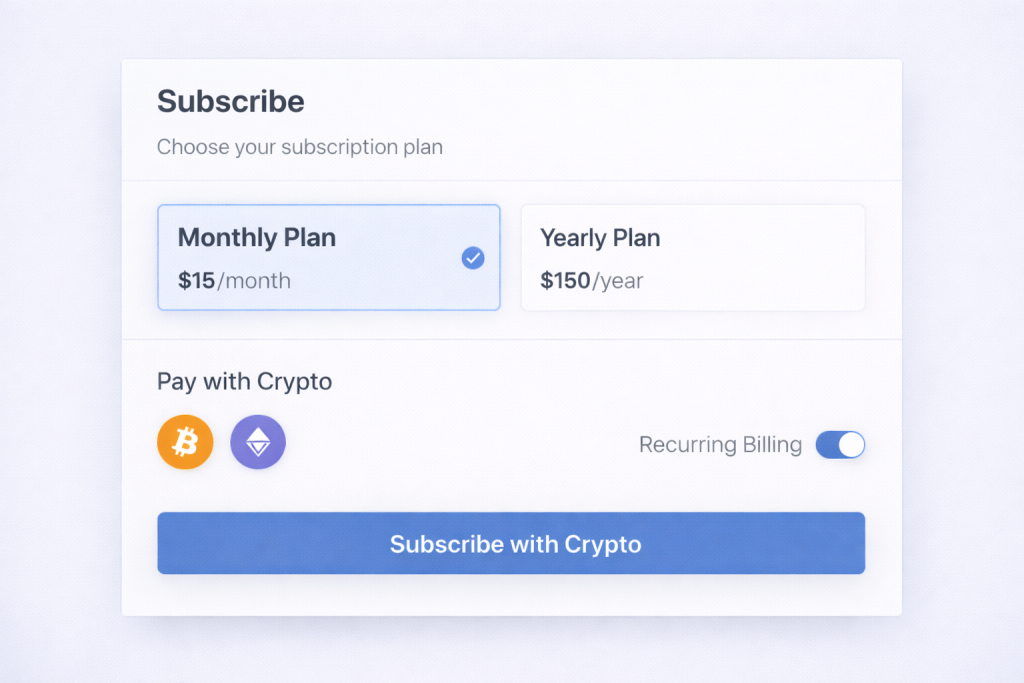
Setting up the parameters for your recurring crypto donations requires precision. Unlike one-time transfers, subscriptions involve automated execution, meaning the smart contract permissions and token specifications must be exact. A single misconfiguration can halt recurring payments or expose funds to unintended access.
Follow these steps to define the token, amount, frequency, and permissions within the Subscribe OnChain interface.
Distribute the subscription link
Once the Onchain subscription is live, the objective shifts to distribution. The payment link is the primary conversion asset. It must be placed where supporters already engage. A single, reliable link reduces friction and prevents lost donations due to navigation errors.
Social media profiles
Add the subscription link to the bio sections of X, LinkedIn, and Instagram. Use a link-in-bio tool if multiple resources are necessary, but keep the donation link as the top priority. Social media bios are static; they serve as the permanent entry point for new visitors who discover the cause through content.
Newsletter integration
Include the subscription link in the signature of all outgoing emails and in the header of monthly updates. Email subscribers are already warm leads. A direct link to the recurring donation page removes the need for them to search for how to contribute. This method captures intent at the moment of engagement.
Website placement
Embed the link in the website navigation bar and on a dedicated "Support" or "Donate" page. The navigation bar provides immediate access from any part of the site. The dedicated page should explain the impact of recurring support, linking the financial action to the mission outcome.
QR codes for offline events
Generate a QR code that redirects to the subscription link. Print this code on business cards, flyers, and presentation slides. QR codes bridge the gap between physical interactions and digital transactions, allowing supporters to subscribe immediately after a conversation or pitch.
Common Setup Mistakes to Avoid
Even a minor configuration error can halt recurring donations or expose funds to unnecessary risk. Before launching your Subscribe OnChain campaign, verify these critical parameters to ensure reliability.
Insufficient Gas or Native Balance
Subscriptions fail if the donor’s wallet lacks the native token (e.g., ETH, SOL) to cover transaction fees. Unlike traditional payments, crypto transactions require gas regardless of the donation amount. Ensure your payment processor’s smart contract is funded with enough native currency to cover processing fees, or instruct donors to maintain a minimum balance. A failed gas payment means a broken subscription and lost revenue.
Incorrect Token Decimals
Ethereum-based tokens vary in decimal precision. USDC uses 6 decimals, while USDT on Ethereum uses 6, but many ERC-20 tokens use 18. If your subscription amount is hardcoded with the wrong decimal multiplier, the contract will either charge too little or reject the transaction. Always verify the token contract’s decimals() function before finalizing the subscription logic.
Overly Broad Approval Permissions
Approving maxUint256 allows the contract to spend your entire token balance indefinitely. This is a significant security risk. Use allowance checks and limit approvals to the specific subscription amount or a reasonable cap. Revoke unnecessary approvals regularly using tools like Revoke.cash to minimize exposure to smart contract vulnerabilities.
Verify transactions and manage subscribers
Once the subscription contract is live, your role shifts from setup to monitoring. You must confirm that recurring payments settle correctly and that subscriber access aligns with payment status. Treat the dashboard as your primary ledger; any discrepancy here requires immediate investigation.
Begin by checking the transaction history for each recurring payment. Verify that the on-chain hash matches the expected interval and amount. If a payment fails, the protocol should automatically notify you or the subscriber. Do not ignore failed transactions; they often indicate expired cards or insufficient funds on the user’s end.
Next, review the subscriber list in the dashboard. Ensure that active subscribers have valid access tokens or NFTs. If a payment bounces, the system should revoke access immediately to prevent unauthorized usage. This automation is critical for maintaining cash flow integrity without manual intervention.
Finally, reconcile your on-chain balance with your off-chain accounting records. Use the dashboard’s export feature to generate a monthly report. Cross-reference this with your bank statements or stablecoin wallets. Any mismatch suggests a smart contract bug or a user error that needs addressing.
No comments yet. Be the first to share your thoughts!