
Set up your Lightning payment node
Before you can accept Bitcoin Lightning payments for your newsletter, you need a node that can generate invoices. Think of your node as the backend of your payment processor: it handles the routing, security, and settlement of funds without touching a traditional bank account.
For most newsletter creators, running a full node on your home computer is overkill. Instead, use a managed node provider. These services handle the heavy lifting of software updates and liquidity management, letting you focus on content. Look for providers that offer a clean API for invoice generation, as this is the core feature you need to automate subscription payments.
When choosing a provider, prioritize those with transparent fee structures and strong community support. The Lightning Network is decentralized, so you have many options. However, reliability matters when your readers are trying to pay for access. A provider that goes offline during peak times will result in lost revenue and frustrated subscribers.
Once you select a provider, create an account and connect it to your newsletter platform. Most platforms have plugins or integrations that allow you to sync your node’s invoice generation capabilities. This connection ensures that when a subscriber pays, they are automatically granted access to your content. Test this flow with a small payment before launching to your full audience.
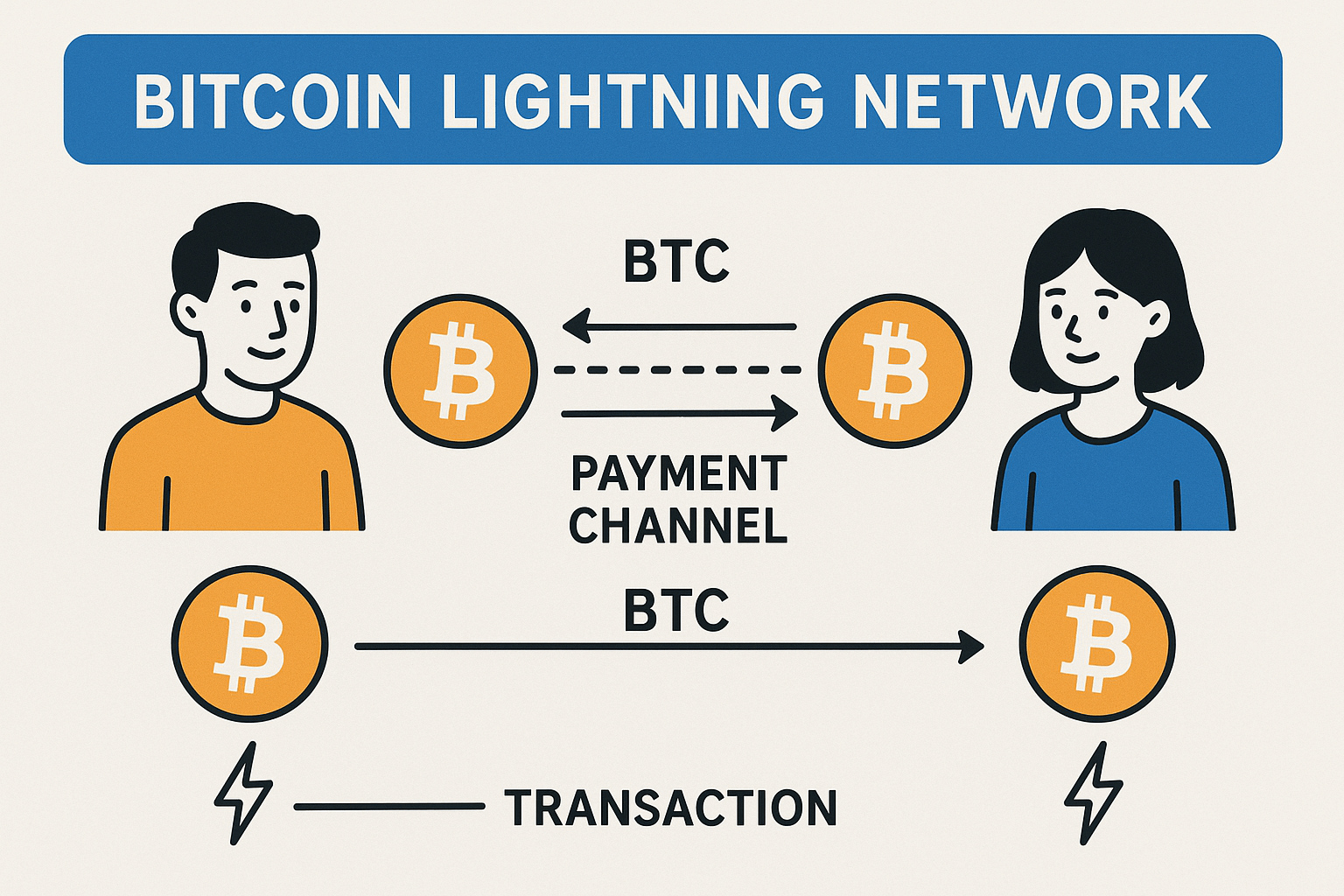
Research providers like Lightning Labs or Zap. Compare their fees, uptime guarantees, and API documentation. Select one that offers a simple integration path for your newsletter platform.
Sign up for the provider and complete any necessary identity verification. Configure your node’s liquidity settings to ensure you can route incoming payments efficiently. Set up your API keys for secure access.
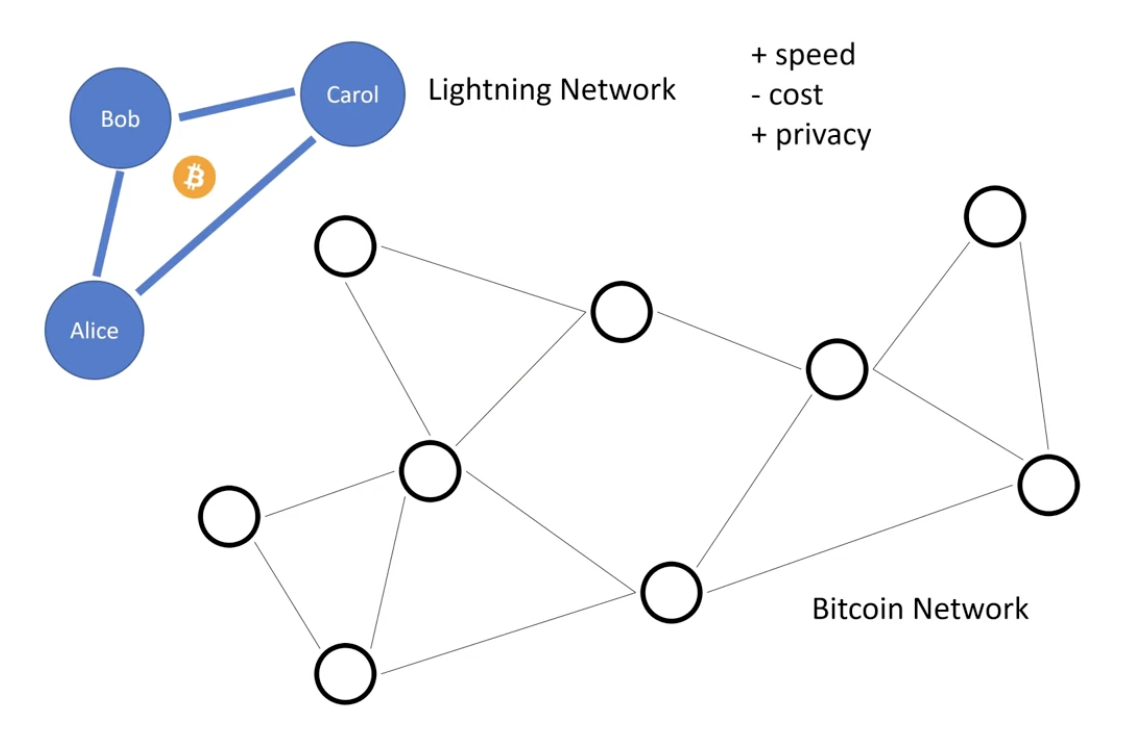
Use your provider’s API to connect your node to your newsletter service. Map the payment events to your subscriber management system so that successful payments trigger automatic access grants.
Send a test payment to your own invoice. Verify that the funds appear in your node’s wallet and that your newsletter platform correctly updates the subscriber’s status. Check for any delays or errors in the confirmation process.
Integrate Lightning invoices into your platform
Adding Bitcoin Lightning payments to your newsletter requires generating unique invoices for each subscriber. This approach ensures that every payment is tracked, allowing you to automate access to premium content without relying on third-party payment processors.
The process varies slightly depending on whether you use a managed platform like Substack or Ghost, or a self-hosted WordPress site. The core principle remains the same: your backend must create a new invoice for every payment attempt to prevent duplicate payments and maintain accurate subscriber records.
Create unique invoices for every payment
Never reuse a Lightning invoice. Reusing an invoice can lead to double-spending issues or incorrect access granting if a user pays twice. Instead, generate a fresh invoice for each subscription cycle. This allows your system to listen for a specific payment event and trigger an action, such as sending a confirmation email or updating a database flag.
Most modern Lightning wallets and payment processors provide an API to create invoices. You will need to pass metadata (like the subscriber's email or user ID) with the invoice so you can identify who paid when the payment arrives.
Connect your platform to a Lightning node
To generate invoices programmatically, you need access to a Lightning node or a service that provides one. For custom sites, you might run a node like LND or Core Lightning. For managed platforms, you can use a payment gateway that handles the node infrastructure.
- Substack: Currently, Substack does not natively support direct Lightning Network payments for subscriptions. You would need to use a third-party payment link or a custom integration that redirects users to a Lightning invoice page before granting access.
- Ghost: Ghost has a robust plugin ecosystem. You can use plugins like "Ghost Lightning" or integrate with payment processors like BTCPay Server to handle Lightning invoices directly within the subscription flow.
- WordPress: WordPress offers plugins like "BTCPay Server" or "CoinGate" that allow you to create Lightning invoices for products and subscriptions. These plugins handle the API communication with your Lightning node or payment processor.
Verify payments and grant access
Once an invoice is created, your system must listen for the payment confirmation. Lightning payments are typically confirmed within seconds. When the payment event is detected, your system should update the subscriber's status to "paid" or "active."
This verification step is critical for security. Do not grant access based on the payment request alone; wait for the payment to be confirmed on the Lightning Network. This prevents fraud and ensures that only paying subscribers get access to your content.
Test the integration before going live
Before launching your paid newsletter, test the entire flow with small amounts. Create an invoice, pay it, and verify that the subscriber status updates correctly. Check that the confirmation email is sent and that the user can access the premium content.
Testing helps you catch issues with your Lightning node, API keys, or platform integrations. It also ensures that your users have a smooth experience when they try to subscribe.
Handle subscription renewals and automation
Recurring payments on Bitcoin Lightning require a shift in mindset from traditional subscription models. You are not dealing with a central bank or a credit card processor that automatically retries failed transactions. Instead, you are managing direct peer-to-peer settlements on a decentralized network. This means automation is not just a convenience; it is the only way to scale a newsletter without drowning in manual invoice management.
The core challenge is that Lightning payments are instantaneous and irreversible. If a subscriber’s wallet runs dry or their node goes offline, the payment fails immediately. Unlike a credit card decline, which might retry over days, a failed Lightning invoice is a hard stop. To handle this, you must build a system that generates unique, time-limited invoices for each renewal cycle and tracks their settlement status in real-time.
Set up automated invoice generation
Your first step is to integrate a Lightning wallet or gateway that supports programmatic invoice creation. Tools like Lightning Labs’ lnd or third-party APIs such as Zapier’s Lightning integration allow you to trigger invoice generation via webhook. When a subscriber’s term ends, your system should automatically create a new invoice for the renewal amount.
It is critical to set a reasonable expiry time for these invoices—typically 24 to 48 hours. This creates a natural urgency for the subscriber to pay while giving them enough time to gather funds. If the invoice expires without payment, your system should immediately flag the subscription as "past due" and pause access to premium content. This prevents the accumulation of unpaid debts and keeps your revenue stream clean.
Manage failed payments and reminders
Automation fails when it is silent. You need a notification layer that alerts both you and the subscriber when a payment does not go through. Configure your system to send an email reminder 12 hours before an invoice expires, and another immediately after it fails. These reminders should include a direct link to a fresh invoice, reducing friction for the subscriber.
Because Lightning transactions are final, you cannot "chargeback" a failed payment. Your strategy must be proactive. Consider offering a small discount for subscribers who enable auto-renewal via recurring payment channels, if your platform supports it. This locks in revenue and reduces the administrative burden of chasing individual invoices. For most newsletter operators, however, a simple, reliable email-to-invoice loop is the most effective starting point.
Pre-launch checklist for subscription automation
Before you launch your paid tier, ensure your infrastructure can handle the following:
-
Invoice Expiry Logic: Verify that expired invoices automatically revoke access to premium content.
-
Webhook Reliability: Test that your server correctly receives and processes payment success events from your Lightning node.
-
Notification Templates: Draft clear, non-spammy email templates for renewal reminders and payment failures.
-
Fallback Payment Method: Decide if you will accept on-chain Bitcoin or fiat for subscribers who struggle with Lightning liquidity, and document this policy clearly.
Manage liquidity and settlement costs
Channel liquidity is the fuel that keeps your Lightning Network payments moving. Without sufficient balance on both sides of a payment path, transactions fail, and your subscribers experience broken payment links. Managing this liquidity is not just a technical requirement; it is a core component of your newsletter’s financial infrastructure.
The goal is to maintain enough funds in your channels to cover subscriber payments while minimizing the fees paid to settle those channels back onto the main Bitcoin blockchain. Think of your Lightning channels like a float register in a physical store: you need enough cash on hand to make change, but you don’t want to keep all your money in the register where it’s inaccessible or at risk. You need a balance between immediate availability and secure storage.
Choose your liquidity strategy
You have two primary ways to manage liquidity: opening new channels or rebalancing existing ones. Each approach has different cost implications and technical requirements. The right choice depends on your current channel balance and the direction of your payment flow.
Opening a new channel is the most straightforward way to add liquidity. You send Bitcoin from your on-chain wallet to a new channel address, and the channel is created. This is ideal when you are out of funds or when your existing channels are "dead" (unbalanced). However, it incurs an on-chain transaction fee, which can be significant during periods of high network congestion.
Rebalancing involves moving funds from one side of a channel to the other. If you have too much balance on the inbound side, you can pay a subscriber to shift funds to the outbound side. This is often free if done peer-to-peer, but it requires finding a counterparty willing to accept the payment. If no peer is available, you may need to force-close and reopen the channel, which is expensive and risky.
Cooperative closing is the process of closing a channel with the agreement of both parties. This is the safest way to remove a channel from your portfolio, as it avoids the risk of force-closing, which could result in losing funds if the other party acts maliciously. Use this when a channel is no longer useful or is too small to maintain efficiently.
Monitor and adjust regularly
Liquidity management is not a set-and-forget task. You need to monitor your channels regularly to ensure they remain balanced and efficient. Use your wallet’s dashboard to track channel balances and payment success rates. If you notice a high failure rate, it is likely a liquidity issue.
Adjust your strategy based on your payment volume. If you are receiving more payments than you are sending, you will need to periodically open new channels or rebalance to maintain outbound capacity. Conversely, if you are sending more than you receive, you may need to encourage inbound liquidity by offering discounts for payments sent to your channels.
By staying proactive about liquidity, you ensure that your subscribers can always pay for your content without interruption. This reliability builds trust and encourages long-term subscriptions, which is the ultimate goal of monetizing your newsletter with Bitcoin Lightning.
Verify payments and track subscribers
You cannot manage a paid newsletter if you do not know who has paid. With Bitcoin Lightning, the settlement is instant, but the confirmation of your CMS subscription status must be explicit. Treat payment verification as the gatekeeper between your wallet and your subscriber list.
Confirm on-chain and Lightning settlements
Lightning payments settle off-chain, meaning they do not appear on the main Bitcoin blockchain immediately. Your payment processor (such as BTCPay Server, Stripe, or a dedicated Lightning gateway) is responsible for broadcasting the final state to the blockchain only when necessary. For your newsletter, you rely on the processor’s webhook to confirm the payment has reached your wallet and is considered "confirmed" by the network.
Do not trust a simple "payment received" email. Configure your system to trigger a webhook event only when the payment is fully settled. This prevents "double-spend" attacks or temporary channel closures from granting access to unpaid subscribers. Official documentation from Lightning Labs emphasizes that Lightning is a decentralized network using smart contract functionality to enable these instant payments, but the trust layer remains your payment gateway.
Update subscriber status in your CMS
Once the webhook confirms the payment, your backend must automatically update the subscriber’s role in your Content Management System (CMS). This is the critical link that unlocks the paid content. If you use Substack, Ghost, or a custom solution, the automation should change the user’s tag from "free" to "paid" immediately.
For manual verification, check your Lightning node’s transaction log. Match the invoice ID from your newsletter platform with the payment hash in your wallet. If the amounts match and the invoice is marked as paid, the subscriber is valid. Automate this where possible to avoid manual reconciliation errors.
Handle failed or pending payments
Not all Lightning payments succeed. Channels may have insufficient liquidity, or the recipient may be unreachable. If a payment fails, do not grant access. Your system should retry the payment request or notify the user to try a different wallet or payment method. Keep a log of these failures to identify recurring issues with specific payment providers or user wallets.
By strictly verifying the payment status before updating subscriber records, you ensure that only paying members access your content. This reliability builds trust with your audience and protects your revenue stream.
Frequently asked questions about Lightning subscriptions
Readers often pause when considering Bitcoin Lightning payments for newsletters. Concerns usually center on legitimacy, technical complexity, and the actual cost of transactions. The following questions address the most common hesitations directly.
These questions highlight why Lightning is becoming a preferred method for direct creator monetization. By removing intermediaries, you keep more revenue while offering subscribers a faster, cheaper experience.
No comments yet. Be the first to share your thoughts!